Dev environment setup
In the following sections you can see how to set up a development environment for esthesis CORE. The development environment varies drastically from the production setup, as its purpose is to allow developers to quickly implement and test new features.
Setting up your development environment is relatively easy, as you can use the production environment Helm charts; with a tweak. The major difference between using Helm to deploy on production and creating a development environment in your machine is that all esthesis services should run locally on your machine, instead of being deployed to the Kubernetes cluster.
Requirements
A dev Kubernetes cluster with at least 16GB of RAM.
Many of the build and helper scripts are written for a Unix/Linux shell. If you are on Windows, you can use WSL or Cygwin.
Promtail. Promtail is used to provide a local UDP GELF endpoint to collect logs and forward them to Loki. If you want to develop and test Loki functionality you need to be running Promtail with the configuration file in
_dev/promtail/config.yaml, e.g.promtail --config.file=config.yaml.Kubens + Kubectx for easy context and namespace switching.
Kubernetes initialisation
Installation
Unless you are on a cluster shared with others, create and use a namespace named "esthesis", so that you can follow the instructions below without having to change parameters. If you are using a different namespace, replace it accordingly.
Add the Esthesis Helm repository:
helm repo add esthesis https://esthes.is/helm helm repo updateInstall the supporting dependencies in
esthesis-helm/esthesis-core-deps, you can find the dev vaulues here:helm install esthesis-core-deps esthesis/esthesis-core-deps \ --namespace esthesis \ --create-namespace \ -f values.dev.yamlInstall the application components in
esthesis-helm/esthesis-core, you can find the dev vaulues here:helm install esthesis-core esthesis/esthesis-core \ --namespace esthesis \ -f values.dev.yaml
Access to resources
To proxy the Kubernetes services of the project to your local machine for development purposes, you can use kubefwd and execute:
kubefwd will proxy all services to your localhost and create local DNS entries for them. The table below summarises the resources you can access after running the above command. Replace
<namespace>with the namespace you have deployed the services to. Note that if you have deployed the services in a different namespace thanesthesis, you need to adjust the namespace element in the domains in the table below:You may need to, occasionally, restart kubefwd, especially if pods get recreated often or if your development machine went through sleep mode.
The Container Registry is deployed as a NodePort service with a randomly assigned port. If you need to specify your own port, you can use the
REGISTRY_NODE_PORTenvironment variable when deploying the Helm Chart.
Resource | URL/host | Credentials |
|---|---|---|
Redis | redis-master.esthesis:6379/0 | (empty) / esthesis-system |
Mosquitto | mosquitto.esthesis:1883 | |
Grafana | http://grafana.esthesis:3000 | esthesis-system / esthesis-system |
InfluxDB Admin UI | http://influxdb.esthesis:8086 | esthesis-system / esthesis-system |
InfluxDB | influxdb.esthesis:8088 | |
MongoDB | mongodb-headless.esthesis:27017 | esthesis-system / esthesis-system |
esthesis CORE UI | http://localhost:4200 | esthesis-admin / esthesis-admin |
Keycloak | http://keycloak.esthesis | esthesis-system / esthesis-system |
Kafka | kafka.esthesis:9095 | |
Kafka UI | http://kafka-ui.esthesis | |
Docker Registry UI | http://docker-registry-user-interface.esthesis/ | |
Orion LD | http://orionld.esthesis:1026 | |
Running the services
The above installation will prepare all the necessary components to support esthesis CORE. The actual backend services as well as the UI, however, will not be installed in Kubernetes. You need to run these in your local machine. Note that we did try Quarkus' remote development mode, but it was a bit finicky, and we ended up losing time when it was not working or not picking up changes correctly.
Frontend
You can start the Angular frontend by running npm start in esthesis-core-ui directory.
Backend
Each backend service comes with its own dev-{service-name}.sh script that you can use to start the service in development mode. You need to run each of the services in a separate terminal window.
Many of the backend services need to access the dependency services (e.g. Keycloak, Kafka, MongoDB, etc.) you have deployed above. To be able to figure out the domain name under which these services are accessible, we are using internally kubens -c, so make sure before you start up a service you have switched to the Kubernetes context and namespace where the services are deployed.
Automation
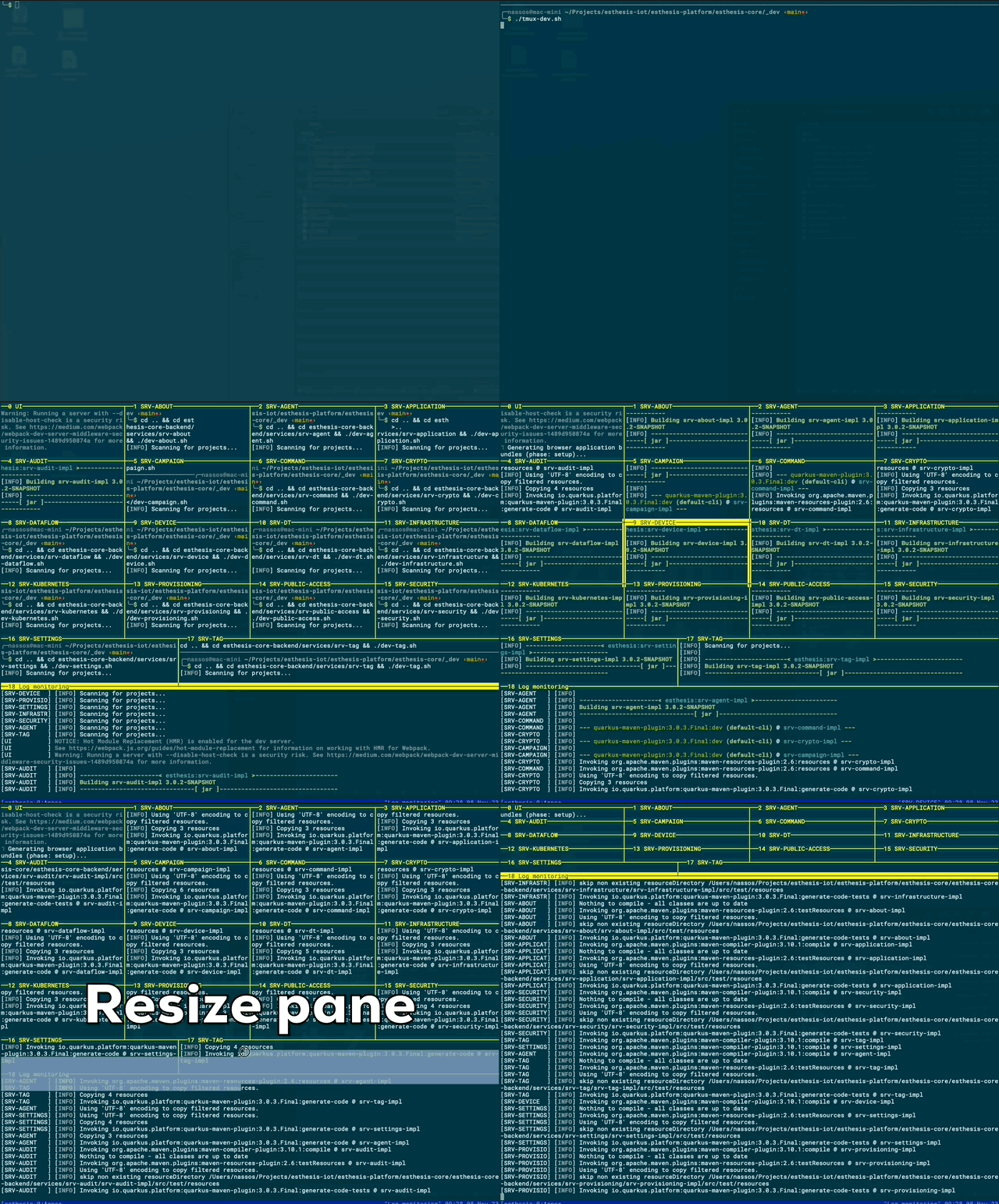
Starting up (and restarting) all those services manually can be a tedious task. We have prepared a tmux script that you can use to start all services in a single terminal window in multiple panes, while merging all log output into another pane. You can find the script in _dev/tmux-dev.sh. We also provide a .tmux.conf file, in case you want to replicate our own tmux look and feel.
Committing code
We are using Conventional Commits. There are plugins for all major IDEs, so you can easily follow the convention.
Notes
Before trying to log in to the application open the (https) Keycloak URL into your browser in order to accept the self-signed certificate. Otherwise, the first redirect from the application's UI to Keycloak will fail.
There is a convenience script
destroy.shin the root of each helm package. You can use it to fully erase all installations performed for that particular package together with any additional Kubernetes resources that do not get automatically deleted by uninstalling the Helm chart (for example, PVCs).Installing all components for development under a single Kubernetes node may require you to increase certain OS limits, here are the ones we have found to be relevant in Ubuntu server 23.04:
sudo sysctl fs.inotify.max_user_instances=1280 sudo sysctl fs.inotify.max_user_watches=655360If you face any issues building the project via Maven, you may also need to increase the number of open files:
ulimit -S -n 65536You can create a
local-env.shscript alongside thedev-{service}.shscripts to customise your local development environment. If such a file exist, it will be sourced by thedev-{service}.sh.srv-kubernetesservice needs to be able to create new pods in your Kubernetes environment. This requires a valid~/.kube/configfile in your home directory. In case you are splitting your Kubernetes config into multiple files, you can use theKUBECONFIGenvironment variable to point to the config file you want to use. You can specify this variable in yourlocal-env.shfile as explained above.